Showing posts with label Technology. Show all posts

August 25, 2018

How to protect your blog from hacking

Your blog is one of the most important things in the world to you. It is the way that you communicate with the outside world, share your passions, and potentially even make your income.
There are other people out there who do not feel the same way.
These hackers want to take your blog and use it for profit by either spamming ad-filled posts on your blog or using your subscriber lists for their criminal purposes.
If your blog is taken over by a hacker, not only might you lose your blog, you might lose some of your readership and your reputation. It is worth any inconvenience to make sure this doesn’t happen.

The Basics

What goes for the rest of the internet doesn’t change for your blog. Many of the threats to your computer can affect your blog as well, so you have to maintain a constant vigilance on both fronts. Know these basics and know them well.

Passwords and Usernames

While it may be convenient for you to have a simple password such as “Password123” or something similar, hackers will be able to crack such a password in five minutes on a slow day. You need something better with different types of characters, no words in the dictionary, and enough characters to keep the number of possibilities high (at least 10). Once you commit a good one to memory, you won’t care so much about the hassle, and it will get easier to remember a new one each time you change it.
If you are looking for some examples of what a good password looks like, check out the listed examples below:
  • Typ561Tesert?
  • M0O0Nrare!
  • J0hnsm1TH
  • !Pra531cTiCal
As for your username, this naturally won’t be as well protected, but there are steps you can take. The biggest one is not using “Admin” as your username.
Many different exploits and attacks hackers use will start on the premise that Admin is a username or profile name on the website, so if you’re using it you’ve made their job a lot easier. Other than this, just make sure not to hand your username out to everyone. Keep it as safe as your password.

Security Software

Your computer is linked to your blog, and there is nothing you can do to change that. If your computer is attacked, consider your blog attacked as well. Any cookies or saved passwords on your device could be stolen and used to gain access to your blog.
You need security software on all of your devices, and you need to make sure it is updated consistently. There are both free programs and premium programs available. Some of the better free products include Panda Free Antivirus, AVG Free Antivirus, and Avira. Some of the best premium programs and brands include Norton, McAfee, and Kaspersky Total Security.
Each has their benefits and disadvantages (for example, Kaspersky is the most expensive, but has every feature you could want), and you will have to decide what is in your budget and most compatible with your needs. Consider it an investment in your blog’s survival.

Email Security

Where your blog is concerned, your email security is of equal importance to your general computer security. If a hacker manages to get into your email account, they can pretty easily find your password and/or your username. This is in addition to the many other problems you will have to deal with when your email is hacked (such as potential identity theft).
This is why your email should be the most protected account you have. If you are particularly cautious, you will want to create a separate email for blogging purposes. You can also use it as a separate contact point for readers so you can more easily organize your emails. A second email address is free and easy to start, so there is no disadvantage to setting one up (other than time).
In addition to this, you will want a strong password (see the tips outlined earlier). Your email account might also have other verification options such as a security image or security question you have to answer whenever you login on a new device. Take any and all of these options, and note that you don’t have to share your email with everyone you meet.

Platforms, Tools, and Plugins

A strong webpage is your first line of defense against potential hackers. Hackers aren’t necessarily lazy, but they are opportunistic and will attack the weakest blog they see. If your blog looks dated, it’s security is probably dated, too. Try to think how a predator thinks, and then take measures that will ward them off. Try to do this from a holistic viewpoint, taking into consideration the platform, the base blog, and any plugins you have installed.

Security Tools and Add-ons

Most blogging platforms, WordPress especially among them, have a lot of tools and plugins available to users in order to make your website more secure. Let us take a look at some of the most popular and useful ones:
  • Acunetix WP Security Scan is one of the first plugins you should download for your blog. Once activated, it will scan your blog and design for any potential security holes and then recommend fixes for you. It is continually improving and is a great introduction to WordPress security.
  • WordFence is likely the most popular and well-known of all the plugins for WordPress right now. The plugin scans the coding of your website, then optimizes your security and allegedly makes it up to fifty times faster. It has some of the best blocking features (you can block entire networks), will scan for both common and not-so-common holes and leaks, and has a firewall. There is a premium option that is great, but the free option is more than enough to protect your blog from most threats.
  • Sucuri Security is a plugin from a company that specializes in auditing and internet security. It will incorporate many different blacklist engines onto your blog to protect it, and it has a ton of monitoring features available so you can know every last thing about the security and activity on your site. It is a fantastic all-around security application.
  • Brute Force Login Protection is probably your best bet if you are being targeted with a botnet attack or, as the name suggests, a brute force attack. Since most of these types of attacks are automated, you need a good level of protection that will work automatically for you, and this plugin will block the IP address of a hacker who tries to log in too many times. You can even get an email when this happens so that you are aware of the frequency of attacks on your site.
Whatever security plugins you choose, be sure to research them thoroughly. Many options are either out of date or malware in disguise and will give you a false sense of security. In the worst case scenario, you could even be giving hackers a front door method of attacking your blog. Doing your homework will save you a lot of money in the long run.
Tip from Kevin: Stick to plugins found in the official WordPress directory. You’ll be able to see when a plugin was last updated, whether it’s compatible with the latest version of WordPress, how often its developers answer “support” questions, and the star rating other users have given it. Plus, all the plugins are free. I like free.
A final tip regarding this is to take an hour or so every few months to review any applications you might be using on your blog. If they are outdated, don’t hesitate to replace them. Cybersecurity evolves too quickly to be loyal to something that no longer works.

Use the Latest Version

If you are using WordPress or another hosting service which has multiple versions, make sure you are using the most recent one available. Hackers find a lot more security holes and problems in older versions of blogging platforms, and the hosts most likely do not support them nearly as much as their latest product.
If you can upgrade, do it now. There are a few disadvantages to upgrading after the first month (where they get the bugs out), and you can take advantage of the other features offered.

Protecting Your Blog on the Go

Many bloggers love to travel or work from outside the home, and this is a great thing. It allows for new perspectives and a faster, more consistent rate of production. However, there are many risks while blogging on the go, and you need to be prepared for them with the right knowledge and the right tools.

Public Networks

When it comes to internet security in general, public networks are your worst enemy and a hacker’s best friend. While they are useful to many people who want to browse the internet for free, most people do not know about the inherent lack of security many of them have.
The biggest problem with a public network is that it is really easy for anyone to intercept your data uploaded or downloaded on the network. Think of your computer as a broadcast tower. Anyone with a receiver and the knowledge to use it can pick up the signal. Unfortunately, the receivers aren’t expensive, and they’re pretty easy for even novice hackers to use.
When your data is picked up in this manner, it can easily be used against you. Try to imagine if your passwords and usernames were just broadcast unencrypted for someone to pick up. If you log in without protection, that is what will happen. Heaven forbid you to try online banking or blog-related financial transactions.

Use a VPN

The best way to counter the problems of public networks is to use a Virtual Private Network (VPN) to defend yourself. What a VPN will do is connect your device via an encrypted connection to another server offsite. This connection can act as a tunnel and will mask your IP address, which will allow you a maximum level of security and privacy. Hackers won’t be able to know anything, even on a public network.
There are many different VPNs out there, and many of them are specialized. Doing some research on the subject will help you find out which to use to ward off hackers on public networks as well as stay private. If you want a decent one, you will have to pay a subscription fee, but it is well worth it compared to the questionable free ones out on the market.
If you travel to other countries or have to access sensitive data, then another important thing about VPNs should be noted. The fact they mask IP addresses and make it appear as if you are browsing in a different country means that you can bypass government censorship if you are in a restrictive country. This is necessary for bloggers who are reporting on risky subjects.

Secure Your Smartphone

If you are traveling or even walking around town, you should make sure your smartphone is on you at all times and you can feel it. There is a huge market for stolen smartphones, and pickpockets love to make profits off of them.
Your smartphone is likely connected to your blog, so if your smartphone gets stolen you need to make changing your password on it one of your first priorities. If a smartphone thief gets a blog to sell in addition to a new phone, you’ll have one more problem on your hands.
If you are worried about traveling with your smartphone, try leaving it in a safe place in the hotel if you don’t think you are going to need it, or place it on your person in a place a pickpocket won’t try to reach. One popular measure is to attach your smartphone to an arm strap that people like to use when working out and then wearing something over it.
Also, try to have some sort of verification measure set up on your phone so that not just anyone can open it. This can take the form of a passcode (that isn’t “1111”), a fingerprint verification, a voice command, or something else. Check to see what options your phone has available and pick the one that fits you and is the most secure.

Conclusion

To review, there are a lot of threats out there, but there is an equal number of defenses. You need to maintain an active and current website, have an adaptable and strong defense for all of your technology, and be even more way when traveling.
The final and best tip is to simply use common sense when using your blog. If something doesn’t look or sound right, don’t get involved. Check out any inconsistencies immediately. Don’t trust anyone.
Thank you for reading. I hope you have a better knowledge of the ways your blog is vulnerable and the ways you can protect yourself from hackers.

August 24, 2018

Get Grammarly premium for free on 2018 (100% Working)

Hello friends, In this post, I'll show you how to get Grammarly premium free. Grammarly is the great tool for correcting the grammar. It is available in both the window Software and browser extension. It helps to students and content writer for correction grammar in their article. English is the one language which is used all over the world. So many of blogger used the English language.
Hence the English is a language to communicate and understand all people worldwide. The Official Grammarly developer divided into two categories one is free and other is premium. To access the premium that helps to improve your writing skill all grammatical errors. Some error is correct punctuation, tenses, passive voice to active voice, etc.
While I find any grammatical mistake in a post, I feel unhappy. To handle this situation I am using proof-reading tools and correct the grammar by manually. So, it takes more time, then I find the Grammarly tool, Which solves all problems.
The premium Grammarly is an advanced grammar correction tool and It help to write a professional style of writing. If you want to use premium account then you need to pay or spend some charges. it is not possible for a student due to their financial problem so they don’t buy a premium tool. I want to help this kind of Grammarly user to access the Grammarly premium account for free.

Get Grammarly premium account for free lifetime
Grammarly premium free account 

What is Grammarly?

Are you sure to write correct English without errors?  For test purpose than Grammarly is a way to correct your writing errors.  It checks the numerous errors in either spelling mistakes or Grammarly error. It also reviews the tenses, verbs subject or anything else. So the Grammarly is the perfect solution and top one grammar correction tool in the world.
This is demonstrated like a human that finds your errors and provides correct solutions. It works anywhere whether the blog post, email, messaging and also find errors in the text file.
If you were using this tool, your writing skill automatically increased. Because this tool run continuously in the background and it indicates the mistake. However, it needs the internet connection.  The free version of Grammarly is correction some errors, but premium version corrects more errors.

A Short Review Of Grammarly Account

Let’s know the how to beginning of this application. This is the World’s best grammar enhancement tool. It launched in the year 2008 by Alex Shevchenko and Max Lytvyn. Not only to check the grammatical errors but also it checks plagiarism. After four years it is progress and set up its San-Francisco headquarters in 2012.


Grammarly Premium Features

Premium Grammarly like a digital English teacher, it is to correct grammar and spelling by detecting more than 250 mistakes. It also takes your grammar to the next level. A unique content or blog post consists of some sentence, grammar, punctuation, etc. These are the central theme of content to make flawless.
  • In the paid version also correct errors as well as show an example of understanding. Sometimes  A beginner’s English writer not know what wrong in his article. This time guide to writing the correct sentence to show some example.
  • In Grammarly free account only correct  150 critical grammar and spelling. However, in premium, you get 250 to more advanced grammar and spelling checks.  Much error is checking so the article should be error free for reader and listener.
  • In the premium version of Grammarly help to add some word repetition.  That is means use the alternative word and make fantastic readability score of your content. It contributes to making your article SEO based.
  • In the premium version of Grammarly add new features that are Plagiarism Checker. Check your content and make it unique. How does it work?  The Grammarly algorithm detected the sentence that posted some else before on any blog. You can quickly change the sentence and generate a unique article.

Grammarly Free vs Premium

The writing tool software is giving you the opportunity to improve your English. It is Correcting your mistake while you are writing. So you don’t need to be worry while writing. Because it will identify mistakes like spelling, tense, punctuation etc.
grammarly free vs premium
They will replace the correct one.so the app is most famous among the students and writers as well as bloggers. This app is giving you the best service. It has two versions. One is free and another one is the premium version.

1) Free version

In the free version, the software is giving you the chance to do spelling mistakes corrections and punctuation check. This free account will be helpful to you also. You can correct your English without paying a single money. It is totally free. You know this free version can give you a chance to correct 150 words in a single touch. So I think this version will be perfect for you.

2) Premium version

This version is not free of cost. It is payable. You can avail it with the subscription. You have to pay for it. You know this version will give you extra benefit than the free version. You will correct 250 words in a touch. It has an advanced vocabulary and conjunction enhancement. So, friends, it can avail the best service from this version.

How to Get Grammarly Premium for Free


Are you interested to use its Premium features? The premium is costly, for a new user; it is not possible to spend money on this type of tool. Don’t worry; I have to Share an idea about six easy method which helps you to get Grammarly Premium subscription for free.

METHOD #1 Grammarly Premium account  and password

  • This is the best and easiest ways to use.
  • You do not need to spend any money to use Grammarly.
  • Just see the below table and get login email and password.
  • Just visit Grammarly official site and log in the email and password which got form below.
USERNAMEPASSWORD
techwebs@pay-mon.com1qaz2wsx
techwebsites@travala10.com3edc4rfv
kedar@hurify1.com5tgb6yhn
gfhyhruddhy@gmail.comgdrehyfb
Notes – Plz don’t change the email and password. Some email doesn’t work correctly due to many users uses login ID and password.
The above account update on 04/06/2018. you can use it now and it works correctly. Let ‘s enjoy Grammarly account for the lifetime.


METHOD #2 Get Free Grammarly Account Via Using Flikover

if you don’t what is Flikover then I told about this websites. The Flikover is a type of websites which provided SEO tool at cheap rates than the real price. You can find a lot of tool like Semrush, Aherf, Grammarly etc. In this blog, must of the tool is paid but you can get Grammarly premium just spend Rs-150/ only. If you want this then follow the below step.
  • Complete the signup using below button.
 Sign Up Flikover
  •  After complete, sign up you can see the Dashboard Tab. Simply Scroll down and click on Grammarly visit tab.
Get Grammarly Premium Account Via Using Flikover
  • Now, install the Two extensions Flikover 1 and Fikover 2 one you Chrome Browser.
  • Buy the Grammarly product just spend Rs150/- and one-month Grammarly subscription.

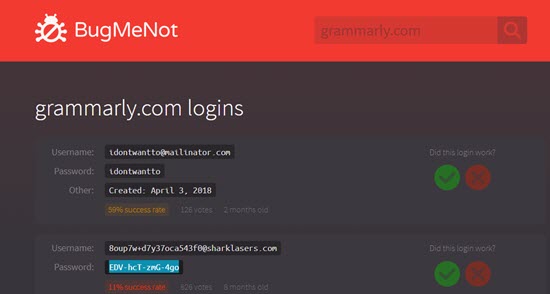
METHOD #3 Bugmenut Website Get ID and PASSWORD

For gaining access to the premium account on Grammarly one must have the Login id and Password of someone who previously buys this plan. There are many different websites which allow the user to access some of this user id and password.
how to get grammarly premium account for free
  • Direct Visit Bugmenot.
  • Page open here asking for the website on which you want login and password.
  • account id and passwords on which the premium is activated already.
This website provides many such ids and password for hotstar and another website like Netflix, Amazon Prime and another website where paid subscription is needed.

July 22, 2018

How to protect your WhatsApp account against hacking

Despite WhatsApp being end-to-end encrypted, it is possible for the popular chat app to be hacked.
Hackers can get access to the personal data associated with your WhatsApp account by various means.
Here is everything you need to know about how WhatsApp accounts can be hacked and how you can safeguard them against the same.
Source: NewsByteApp 
Duping users

How can your WhatsApp account be hacked?

Even though the same WhatsApp number cannot be used on two different mobile devices at the same time, your personal chats can be spied upon via WhatsApp Web.
Hackers just need to acquire your WhatsApp Web QR code. Another way in which WhatsApp accounts are hacked is by registering your WhatsApp number on another device, activating your account, and recovering all your chats.
How to check if your WhatsApp account has been hacked?

Activated accountsHow to check if your WhatsApp account has been hacked?

You can check if your WhatsApp Web is active on an unknown device by clicking on the three dots at the top-right corner of your WhatsApp screen. Go to "WhatsApp Web" and check the list of all open sessions.
Next, if your WhatsApp is displaying the message, "This phone could not be verified," the account has been registered with your number on another device.

ALSO READ: B’DAY:देशभक्ति फिल्मों के सरताज मनोज कुमार, जिसने उठाया था बिग बी का भी करियर

Regain accessWhat to do if your WhatsApp account has been hacked?

Log out of all active WhatsApp Web sessions and the hacker will instantly lose access to your account.
Deactivate your account by e-mailing the issue to support@whatsapp.com. If you don't reactivate it in 30 days, it will get deleted.
Delete and reinstall the app so that your account is re-registered with a fresh verification code and automatically logs out from any unauthorized sessions.

PrecautionsHow to protect your WhatsApp account against hacking?

Enable two-step authentication on your account by going to WhatsApp > Menu > Settings > Account > Enable 2 Step-verification.
This way, if someone tries to activate your account on another device, he will be asked for a security code he won't know.
Lock WhatsApp with App Lock, so that even if someone catches hold of your phone, he is unable to access WhatsApp.

10 lesser known WhatsApp tricks you should try now

Almost every person who owns a smartphone uses WhatsApp, the Facebook-owned instant messaging app, which has now evolved into a multi-purpose platform.
However, there are many lesser-known tricks that can help users get the most out of WhatsApp.
Source: NewsByteApp
From reading deleted messages to marking chats as "unread" to creating your own GIFs, here are 10 tips and tricks every WhatsApp user should know.
 WhatsApp Groups

You can restrict group members from sending messages, dismiss admins

WhatsApp rolled-out several features to give more powers to group admins/founders.
Admins can restrict members from sending messages and changing the group title/subject, icon, and description. This can be done by tapping on "Group Settings" under "Group Info".
Also, admins can demote other admins using "Dismiss as Admin" feature (by long-pressing on admin's name in "Group Info"). However, group-founders cannot be dismissed as admins.
Users can delete sent messages and also read deleted ones
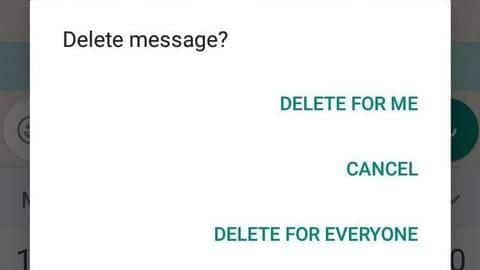
Delete for everyone

Deleted messagesUsers can delete sent messages and also read deleted ones

Users can delete sent messages using the "Delete for Everyone" feature by selecting the particular message and clicking on "Delete".
Whenever a message gets deleted, it gets replaced with the "This message was deleted" message in both the sender and recipient's chat.
Recipients can, however, read deleted messages using third-party apps like Notification History and WhatsRemoved which read device notifications and retrieve deleted messages.

Real-time LocationThis feature allows you to share your 'live location'

WhatsApp users can share their location in real-time with contacts/groups.
This can be done by clicking on the "attachment icon" within the chat and choosing to "Share Live Location" for 15 minutes/1 hour/8 hours. Users can add comments and also cancel "location-sharing" anytime.
The feature could be useful when you're lost somewhere or want someone, like your parents or friends, to track your movement.

Account info reportSee what data WhatsApp has collected from you

Users can request their "Account Info Report" to know what data WhatsApp has collected from them under Settings>Account>Request account info.
Though it doesn't contain conversations, it shows all other details like their account information and settings.
The report includes the user's phone number, profile photo, device type, name of device manufacturer, previous IP connection, all the contacts' numbers (including blocked ones), group names, etc.

WhatsApp WebEveryone who uses WhatsApp Web must use these tricks

WhatsApp Web (desktops/laptops) users can send emojis using the "Emoji button" near the text-area, but there's another fun way to do it.
Users can type a colon (:) and start entering the first 2-3 letters of the emotion they wish to express to select emojis directly; for example - ":happy" displays all related emojis.
WhatsApp Web also converts emoticons like ":-)" to emojis automatically.

Different App LanguagesEnglish isn't the only language to communicate in on WhatsApp

Most users probably are unaware that WhatsApp supports several other languages in which users can communicate.
Apart from English, WhatsApp currently supports ten Indian languages, including Hindi, Bengali, Punjabi, Telugu, Marathi, Tamil, Urdu, Gujarati, Kannada, and Malayalam for Indians.
The app language can be changed by going to "Settings" and selecting Chats > App Language > Click on any one of the languages.

Images, GIFsYou can edit images and even create GIFs within WhatsApp

Users can customize photos/videos before sending by adding stickers, filters, and text or even doodle on them.
Also, they can create their own GIFs on WhatsApp by selecting a video to be sent and decreasing its length to "6 seconds" or less in the video editing section. They can then see an option to convert to the six-second (or less) video into a GIF.

Other tricksMark messages as unread, listen to voice-messages through earpiece

Users can mark read messages as "unread" by selecting a conversation and choosing "Mark as Unread" option. However, it doesn't change anything for the sender.
Another interesting trick is for listening to voice-messages. When you don't want to listen to voice-notes through loudspeaker but don't have your earphones, you can hold the phone to your ear and automatically listen to them through the earpiece.

July 15, 2018

Fake news & its Disadvantages.

Roman politician and general Mark Antony killed himself because of misinformation.
  • In the 13th century BC, Rameses the Greatspread lies and propaganda portraying the Battle of Kadesh as a stunning victory for the Egyptians; he depicted scenes of himself smiting his foes during the battle on the walls of nearly all his temples. The treaty between the Egyptians and the Hittites, however, reveals that the battle was actually a stalemate.
  • During the first century BC, Octavian ran a campaign of misinformation against his rival Mark Antony, portraying him as a drunkard, a womanizer, and a mere puppet of the Egyptian queen Cleopatra VII.[36] He published a document purporting to be Marc Antony's will, which claimed that Marc Antony, upon his death, wished to be entombed in the mausoleum of the Ptolemaic pharaohs. Although the document may have been forged, it invoked outrage from the Roman populace. Marc Antony ultimately killed himself after his defeat in the Battle of Actiumupon hearing false rumors propagated by Cleopatra herself claiming that she had committed suicide.
  • During the second and third centuries AD, false rumors were spread about Christians claiming that they engaged in ritual cannibalism and incest. In the late third century AD, the Christian apologist Lactantiusinvented and exaggerated stories about pagans engaging in acts of immorality and cruelty, while the anti-Christian writer Porphyry invented similar stories about Christians.
  • In 1475, a fake news story in Trent claimed that the Jewish community had murdered a two-and-a-half-year-old Christian infant named Simonino. The story resulted in all the Jews in the city being arrested and tortured; fifteen of them were burned at the stake. Pope Sixtus IV himself attempted to stamp out the story, but, by that point, it had already spread beyond anyone's control. Stories of this kind were known as "blood libel"; they claimed that Jews purposely killed Christians, especially Christian children, and used their blood for religious or ritual purposes.
  • After the invention of the printing press in 1439, publications became widespread but there was no standard of journalistic ethics to follow. By the 17th century, historians began the practice of citing their sources in footnotes. In 1610 when Galileo went on trial, the demand for verifiable news increased.
  • During the 18th century publishers of fake news were fined and banned in the Netherlands; one man, Gerard Lodewijk van der Macht, was banned four times by Dutch authorities—and four times he moved and restarted his press. In the American colonies, Benjamin Franklin wrote fake news about murderous "scalping" Indians working with King George III in an effort to sway public opinion in favor of the American Revolution.
  • During the era of slave-owning in the United States, supporters of slavery propagated fake news stories about African Americans, whom white people considered to have lower status. Violence occurred in reaction to the spread of some fake news events. In one instance, stories of African Americans spontaneously turning white spread through the south and struck fear into the hearts of many people.
  • During the First World War, an example of anti-German atrocity propaganda was that of an alleged "German Corpse Factory" in which the German battlefield dead were rendered down for fats used to make nitroglycerine, candles, lubricants, human soap, and boot dubbing. Unfounded rumors regarding such a factory circulated in the Allied press starting in 1915, and by 1917 the English-language publication North China Daily News presented these allegations as true at a time when Britain was trying to convince China to join the Allied war effort; this was based on new, allegedly true stories from The Times and The Daily Mail that turned out to be forgeries. These false allegations became known as such after the war, and in the Second World War Joseph Goebbels used the story in order to deny the ongoing massacre of Jews as British propaganda. According to Joachim Neander and Randal Marlin, the story also "encouraged later disbelief" when reports about the Holocaust surfaced after the liberation of Auschwitz and Dachau concentration camps. After Hitler and the Nazi Party rose to power in Germany in 1933, they established the Reich Ministry of Public Enlightenment and Propaganda under the control of Propaganda Minister Joseph Goebbels. The Nazis used both print and broadcast journalism to promote their agendas, either by obtaining ownership of those media or exerting political influence. Throughout World War II, both the Axis and the Allies employed fake news in the form of propaganda to persuade publics at home and in enemy countries. The British Political Warfare Executive used radio broadcasts and distributed leaflets to discourage German troops.
  • In the 21st century, the impact of fake news became widespread, as well as the usage of the term. The opening of the internet to the people in the 90s was a movement meant to allow them access to information. Over time, the internet has grown to unimaginable heights with tons of information coming in all the time which allows the internet to be a host for plenty of unwanted, untruthful and misleading information that can be made by anyone. Besides referring to made-up stories designed to deceive readers into clicking on links, maximizing traffic and profit, the term has also referred to satirical news, whose purpose is not to mislead but rather to inform viewers and share humorous commentary about real news and the mainstream media. United States examples of satire (as opposed to fake news) include the television show Saturday Night Live'Weekend UpdateThe Daily ShowThe Colbert ReportThe Late Show with Stephen Colbert and The Onion newspaper.

July 13, 2018

Comparison of these smartphones: OPPO FIND X vs VIVO NEX S vs GALAXY S9 vs IPHONE X vs PIXEL 2XL.

So while the pop-up selfie camera looks super cool, it may not be the best idea in the long run, when the dust (pocket lint) settles into the mechanism. However, Oppo claims it has tested the mechanism well. The same mechanism also does not allow for an IP rating as well. This means, that your iPhone XGoogle Pixel 2 XL or Samsung Galaxy S9+ are still better off than Oppo and Vivo’s offerings when it comes to using it in the #MumbaiRains.
But if you are looking for the latest hardware with some bragging rights, the Oppo Find X will have you covered as is visible from the specifications table below.
SmartphoneOppo Find XVivo Nex SSamsung S9+iPhone XGoogle Pixel 2 XL
Display Size (inch)6.426.596.25.86
Resolution (pixels)1080 x 23401080 x 32161,440 x 2,9602436 x 11251440 x 2880
Pixel Density (PPI)401388529458538
Display TypeAMOLEDSuper AMOLEDSuper AMOLEDOLED Super Retina HDRpOLED
Dimensions(mm)156.7 x 74.2 x 9.4162 x 77 x 8158.1 x 73.8 x 8.5143.6 x 70.9 x 7.7157.9 × 76.7 × 7.9
Weight (gm)186199189174175
Dual SIMYesYesYes (Variant)NoNo
SIM TypeNano-SIMNano-SIMNano-SIMNano-SIMNano-SIM
Connectivity TypesGSM / HSPA / LTEGSM / HSPA / LTEGSM / HSPA / LTELTE, SCDMA, CDMA EV-DO Rev. A, UMTS/HSPA+/DC-HSDPA, GSM/EDGEGSM / CDMA / HSPA / LTE / VoLTE
ProcessorQualcomm Snapdragon 845Qualcomm Snapdragon 845Qualcomm Snapdragon 845, Exynos 9810A11 Bionic chip with 64-bit architectureQualcomm Snapdragon 835
CPU CoresOcta-coreOcta-coreOcta-core, Octa-coreHexa-coreOcta-core
CPU Clock Speed (GHz)4x2.8 GHz Kryo 385 & 4x1.8 GHz Kryo 3854x2.7 GHz Kryo 385 & 4x1.8 GHz Kryo 3854x Kryo 385 Gold @ 2.7 & 4x Kryo 385 Silver @ 1.7 and 4x Mongoose M3 @ 2.8 & 4x Cortex A55 @ 1.7Hexa-core 4 x effieciency cores + 2 Performance cores4x Kryo 280 @ 2.35 & 4x Kryo 280 @ 1.9
GPUAdreno 630Adreno 630Adreno 630, Mali G72 MP18-Adreno 540
RAM8 GB8 GB6 GB3GB4 GB
RuggednessIP68IP67 under IEC standard 60529IP67
On-Board Memory256 GB128, 256 GB64, 128, 256 GB64 GB, 256 GB64 GB, 128 GB
Expandable MemoryNoNoYes, up to 256GBNoNo
SensorsFace unlock, accelerometer, gyro, proximity, compassFace unlock, fingerprint (rear-mounted), under-display fingeprint accelerometer, gyro, proximity, barometer, compassIris scanner, fingerprint, Accelerometer, Gyroscope, Proximity, Compass, Barometer, Heart-rate, SpO2Face ID Barometer Three-axis gyro Accelerometer Proximity sensor Ambient light sensorFingerprint, Accelerometer, Gyroscope, Proximity, Compass, Barometer, Active Edge, Magnetometer, Hall effect
Primary Camera16 MP, f/2.0 (PDAF, OIS) + 20 MP,f/2.012MP, f/1.5-2.4, 12 MP f/2.4 52 mm12 MP wide-angle ƒ/1.8 aperture, telephoto ƒ/2.4 aperture12.2 MP, f/1.8
Optical Image StabilizationYesYesYesYesYes
Camera ArrayDual CameraDual CameraDual CameraDual CameraSingle Camera
Autofocus SystemPhase detection autofocusDual pixel, phase detection autofocusPhase detectionAutofocus with Focus PixelsLaser + Dual-Pixel Phase detection
Secondary Camera25 MP, f/2.08 MP, f2/08MP, f/1.77 MP, f/2.28MP, f/2.4
Video Capture720p @ 480 fps, 1080p @240 fps, 2160p @ 30 fps1080p @30 fps, 2160p @ 30 fps720p @ 960 fps, 1080p @ 240 fps, 2160p @ 60fps, HDR1080p @ 240 fps, 2160p @ 60 fps720p @ 240 fps, 1080p @ 120 fps, 2160p @ 30 fps
FlashDual-LEDDual-LEDLEDQuad-LEDDual-LED
OS VersionAndroid 8.1 OreoAndroid 8.1 OreoAndroid 8.0 OreoiOS 11Android 8 Oreo
AI (Smart Assistant)Google AssistantGoogle AssistantYes, BixbySiriYes, Google Assistant
GPSYesYesYes802.11ac Wi‑Fi with MIMOYes
Wi-FiWi-Fi 802.11 a/b/g/n/ac, dual-band, Wi-Fi Direct, hotspotWi-Fi 802.11 a/b/g/n/ac, dual-band, Wi-Fi Direct, hotspotWi-Fi 802.11 a/b/g/n/ac, Dual-band, Wi-Fi Direct, Hotspotv 5.0Wi-Fi 802.11 a/b/g/n/ac, dual, band, Wi-Fi Direct, DLNA
Bluetooth5.0, A2DP, LE5.0, A2DP, LEv5.0, A2DP, LE, aptXYesv5, A2DP, LE, aptX HD
NFCYesNoYesNoYes
InfraredNoNoNoNoNo
Fingerprint ScannerNoYes, Under displayYes, Rear buttonNoYes, Rear button
3.5mm jackNoYesYesNoNo
RadioNoNoYes, FM RadioNoNo
USB TypeType-C 1.0 reversible connectorType-C 1.0 reversible connectorType-C Reversible connectorReversible connectorType-C Reversible connector
USB StandardUSB v2.0USB v2.0USB 3.1LightningUSB 2.0
Battery (mAh)3,7304,0003,5002,7163,520
Fast chargingYesYesYesYes
ColorsColours Bordeaux Red, Glacier BlueRed, BlackMidnight Black, Coral Blue, Titanium Gray, Lilac PurpleSpace Grey, SilverBlack & White, Just Black
Prices in IndiaRs 59,990TBA (estimated Rs 73,000)Rs 68,900Rs 89,000Starting Rs 73,000

While Vivo’s soon to be launched Nex S will be the Oppo Find X’s true competitor, the Find X for some reason feels special thanks to its design approach and stands tall of what can be achieved with Android, when manufacturers stop looking at Apple’s iPhone for design inspiration.
Vivo offers something different as well with in-display fingerprint readers and a smaller pop-up camera but it somehow does not have the presence of the Oppo Find X.